Add Fillet to your home screen
Install Fillet on your phone's home screen to launch it like a native app — no download, no app store.
iPhone and iPad (Safari)
This feature works in Safari only. If you're using Chrome or another browser on iPhone, switch to Safari first.
- Open web.getfillet.com/launcher in Safari.
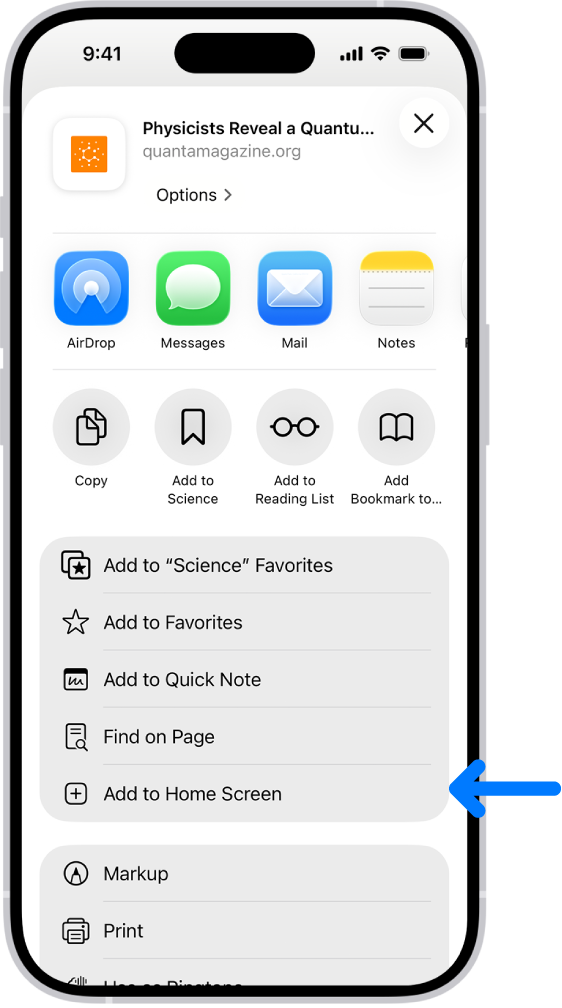
- Tap the Share button — the square icon with an upward arrow at the bottom of the screen.
- Scroll down and tap Add to Home Screen.
- Name the app Fillet and tap Add.
The Fillet icon will appear on your home screen. Tap it to open the app directly.
Android (Chrome)
- Open web.getfillet.com/launcher in Chrome.
- Tap the three-dot menu in the upper-right corner.
- Tap Add to Home screen.
- Name the app Fillet and tap Add.
The Fillet icon will appear on your home screen. Tap it to open the app directly.